From Manual SSH Deploys to Zero-Downtime GitOps: A Production Pipeline Architecture

From Manual SSH Deploys to Zero-Downtime GitOps: A Production Pipeline Architecture
Introduction
This article documents the complete architectural evolution of a production-grade GitOps pipeline: from manual EC2 deployments to fully automated, security-gated, blue/green ECS Fargate deployments with automatic rollback. The goal is not to present a finished tutorial, but to explain the why behind each architectural decision, the failures encountered along the way, and the production considerations that most platform engineering guides leave implicit.
The application layer is a full-stack Notes management system — Next.js frontend, NestJS backend, PostgreSQL database, and Nginx reverse proxy — deployed as a multi-container ECS Fargate task. The infrastructure and pipeline are the subject.
Repository: github.com/celetrialprince166/gitops_lab
Background & Context
The core problem with manual deployments is not that they're slow — it's that they're non-deterministic. The same sequence of commands produces different outcomes depending on the state of the server, the network at that moment, whether a previous deployment was cleaned up properly, and the operator's attention on a given day.
GitOps inverts this model: the Git repository becomes the single source of truth. Every deployment is triggered by a Git event, executed by a pipeline, and the infrastructure state is always derivable from the repository state. A deployment that cannot be reproduced from the Git history is not a deployment — it's a manual intervention wearing a deployment's clothes.
This project was built in four explicit phases, each designed to address a specific failure mode of the phase before it.
Architecture Overview
The final architecture consists of four integrated layers:

Layer 1 — Source Control & CI Trigger: GitHub repository. Pull requests run tests and security scans. Merges to main trigger the full deployment pipeline.
Layer 2 — CI/CD Pipeline (Jenkins + GitHub Actions): Jenkins provides the security-gated pipeline with 7 scanning stages. GitHub Actions provides the lightweight alternative. Both converge on the same deployment target.
Layer 3 — Container Registry & Orchestration (ECR + ECS Fargate): Three ECR repositories (backend, frontend, proxy) with automatic image scanning. ECS Fargate runs the task definition with CodeDeploy as the deployment controller.
Layer 4 — Traffic Management (ALB + CodeDeploy): Application Load Balancer with two target groups (Blue and Green). CodeDeploy orchestrates the traffic shift. CloudWatch alarms trigger automatic rollback.
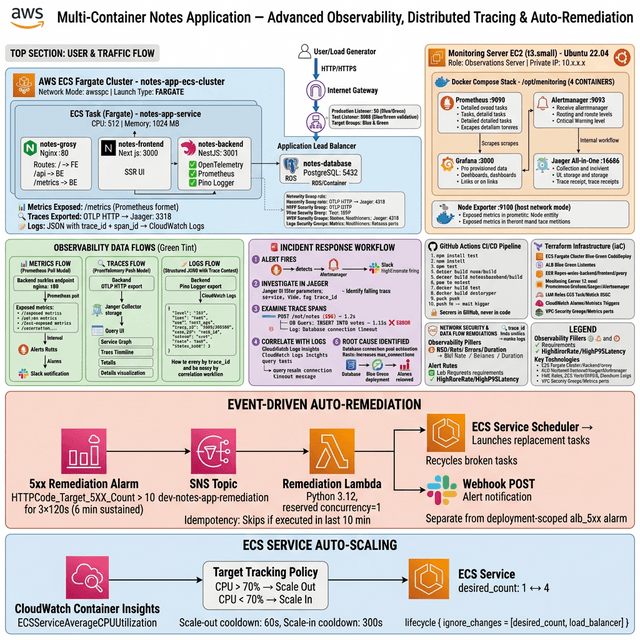
Observability runs across all layers: Prometheus scrapes application metrics, Grafana provides dashboards, Alertmanager routes alerts to Slack, and CloudTrail provides the audit trail.
Infrastructure as Code: The Terraform Module Design
All AWS infrastructure is defined in Terraform. Seventeen .tf files covering networking, compute, security, monitoring, and audit:
terraform/
├── main.tf           # Provider, data sources, locals
├── variables.tf      # 16+ configurable inputs
├── outputs.tf        # 50+ outputs (for GitHub Secrets automation)
├── ecr.tf            # 3 ECR repos with image scanning
├── ecs.tf            # ECS cluster, service, bootstrap task definition
├── alb.tf            # ALB, 2 target groups, 2 listeners (80 + 8080)
├── codedeploy.tf     # Blue/green deployment group and application
├── ecs_iam.tf        # Task execution role, task role
├── ecs_sg.tf         # ECS security groups
├── sg_rules.tf       # Inter-security-group ingress rules
├── cloudwatch.tf     # Log groups for all 4 containers
├── cloudtrail.tf     # Audit trail → S3
├── guardduty.tf      # Threat detection
├── monitoring.tf     # Prometheus/Grafana EC2 provisioning
└── iam.tf            # Jenkins and GitHub Actions OIDC roles
The ECS Service and the Terraform/CI Boundary
The most architecturally significant line in the entire Terraform configuration is this:
resource "aws_ecs_service" "app" {
  name    = "${var.project_name}-service"
  cluster = aws_ecs_cluster.main.id

  deployment_controller {
    type = "CODE_DEPLOY"
  }

  lifecycle {
    ignore_changes = [task_definition, load_balancer]
  }
}
The lifecycle { ignore_changes } block defines the boundary between what Terraform owns and what the CI/CD pipeline owns. Terraform provisions and manages the ECS service infrastructure: its networking configuration, IAM roles, security groups, and cluster membership. Jenkins manages task definition revisions: which container images are deployed and at which versions.
Without this boundary, every terraform apply — triggered by infrastructure changes — would revert the task definition to whatever revision Terraform last recorded, overwriting whatever version Jenkins had deployed. This is one of the most common sources of unexplained rollbacks in mixed Terraform/CI deployments.
ALB Configuration for Blue/Green
Blue/green requires two target groups and two listeners:
# Production listener — port 80, routes to active (Blue) target group
resource "aws_lb_listener" "production" {
  load_balancer_arn = aws_lb.main.arn
  port              = "80"
  protocol          = "HTTP"

  default_action {
    type             = "forward"
    target_group_arn = aws_lb_target_group.blue.arn
  }
}

# Test listener — port 8080, routes to Green (staging) target group
resource "aws_lb_listener" "test" {
  load_balancer_arn = aws_lb.main.arn
  port              = "8080"
  protocol          = "HTTP"

  default_action {
    type             = "forward"
    target_group_arn = aws_lb_target_group.green.arn
  }
}
Port 8080 is the test listener. During a deployment, Green tasks are health-checked through this listener before any production traffic shifts. This allows pre-production validation before users see the new version.
The CI/CD Pipeline Architecture
Jenkins Security-Gated Pipeline
The Jenkins pipeline implements seven security stages before any deployment occurs:
pipeline {
  agent any
  environment {
    ECR_REGISTRY = credentials('ecr-registry')
    AWS_REGION   = 'eu-west-1'
    GIT_TAG      = sh(returnStdout: true, script: 'echo ${GIT_COMMIT:0:7}').trim()
  }

  stages {
    stage('Secret Scan') {
      steps {
        sh '''
          gitleaks detect --source . \
            --report-format json \
            --report-path gitleaks-report.json \
            --exit-code 0  # lab mode: report, don't block
        '''
      }
    }

    stage('Static Analysis') {
      steps {
        dir('backend')  { sh 'npx tsc --noEmit && npx eslint src/' }
        dir('frontend') { sh 'npx tsc --noEmit && npx eslint app/' }
      }
    }

    stage('Dependency Audit') {
      steps {
        dir('backend')  { sh 'npm audit --audit-level=high --json > npm-audit-backend.json || true' }
        dir('frontend') { sh 'npm audit --audit-level=high --json > npm-audit-frontend.json || true' }
      }
    }

    stage('SonarCloud Analysis') {
      environment {
        SONAR_TOKEN = credentials('sonar-token')
      }
      steps {
        withSonarQubeEnv('SonarCloud') {
          sh 'npx sonar-scanner -Dsonar.projectKey=notes-app'
        }
      }
    }

    stage('Build Images') {
      steps {
        sh '''
          docker build -t notes-backend:${GIT_TAG} ./backend
          docker build -t notes-frontend:${GIT_TAG} ./frontend
          docker build -t notes-proxy:${GIT_TAG} ./nginx
        '''
      }
    }

    stage('Image Scan') {
      steps {
        sh '''
          trivy image --format json \
            --output trivy-backend.json \
            --exit-code 0 \
            notes-backend:${GIT_TAG}
        '''
      }
    }

    stage('SBOM Generation') {
      steps {
        sh '''
          syft notes-backend:${GIT_TAG} \
            -o cyclonedx-json=sbom-backend-cyclonedx.json \
            -o spdx-json=sbom-backend-spdx.json
        '''
      }
    }
  }
}

Note: All gates use exit-code 0 (report-only mode). To promote to production, change --exit-code to 1 on Trivy and wire SonarCloud quality gate breaks to pipeline failure. The infrastructure for hard gates is already in place.
ECR Push and Task Definition Registration
After the security gates pass, the pipeline pushes images to ECR and registers a new task definition revision:
stage('Push to ECR') {
  when { branch 'main' }
  steps {
    sh '''
      aws ecr get-login-password --region ${AWS_REGION} | \
        docker login --username AWS --password-stdin ${ECR_REGISTRY}

      docker tag notes-backend:${GIT_TAG} ${ECR_REGISTRY}/notes-backend:${GIT_TAG}
      docker push ${ECR_REGISTRY}/notes-backend:${GIT_TAG}
      docker push ${ECR_REGISTRY}/notes-backend:latest
    '''
  }
}

stage('Register Task Definition') {
  when { branch 'main' }
  steps {
    sh '''
      ./ecs/render-task-def.sh \
        --region ${AWS_REGION} \
        --ecr-registry ${ECR_REGISTRY} \
        --image-tag ${GIT_TAG} \
        --db-username ${DB_USERNAME} \
        --db-password ${DB_PASSWORD}

      TASK_DEF_ARN=$(aws ecs register-task-definition \
        --cli-input-json file://ecs/task-definition-rendered.json \
        --query taskDefinition.taskDefinitionArn \
        --output text)

      echo "TASK_DEF_ARN=${TASK_DEF_ARN}" > ecs/task-def-arn.env
    '''
  }
}
The render-task-def.sh script substitutes placeholder tokens in the task definition template (__BACKEND_IMAGE__, __FRONTEND_IMAGE__, __DB_USERNAME__, etc.) with runtime values. This keeps credentials out of version control while making the task definition template itself fully reviewable.
The Blue/Green Deployment Mechanism
CodeDeploy Deployment Group Configuration
resource "aws_codedeploy_deployment_group" "ecs" {
  app_name               = aws_codedeploy_app.ecs.name
  deployment_group_name  = "${var.project_name}-dg"
  service_role_arn       = aws_iam_role.codedeploy.arn
  deployment_config_name = "CodeDeployDefault.ECSLinear10PercentEvery1Minutes"

  ecs_service {
    cluster_name = aws_ecs_cluster.main.name
    service_name = aws_ecs_service.app.name
  }

  load_balancer_info {
    target_group_pair_info {
      prod_traffic_route {
        listener_arns = [aws_lb_listener.production.arn]
      }
      test_traffic_route {
        listener_arns = [aws_lb_listener.test.arn]
      }
      target_group {
        name = aws_lb_target_group.blue.name
      }
      target_group {
        name = aws_lb_target_group.green.name
      }
    }
  }

  auto_rollback_configuration {
    enabled = true
    events  = ["DEPLOYMENT_FAILURE", "DEPLOYMENT_STOP_ON_ALARM"]
  }

  alarm_configuration {
    alarms  = [aws_cloudwatch_metric_alarm.target_5xx.name]
    enabled = true
  }
}
The CodeDeployDefault.ECSLinear10PercentEvery1Minutes deployment configuration shifts exactly 10% of traffic per minute. A complete deployment takes 10 minutes from zero traffic on Green to 100% traffic on Green.
The auto-rollback is configured to fire on two events:
DEPLOYMENT_FAILURE— a deployment stage fails (task fails health check, can't start, etc.)DEPLOYMENT_STOP_ON_ALARM— the CloudWatch 5xx alarm fires during traffic shifting
The CloudWatch alarm monitoring 5xx rates is what makes this automatic:
resource "aws_cloudwatch_metric_alarm" "target_5xx" {
  alarm_name          = "${var.project_name}-5xx-alarm"
  comparison_operator = "GreaterThanThreshold"
  evaluation_periods  = "2"
  metric_name         = "HTTPCode_Target_5XX_Count"
  namespace           = "AWS/ApplicationELB"
  period              = "60"
  statistic           = "Sum"
  threshold           = "10"
  alarm_actions       = [aws_codedeploy_deployment_group.ecs.arn]
}
If 5xx responses exceed 10 in any 60-second window during a deployment, the alarm triggers and CodeDeploy immediately restores 100% traffic to Blue.

ECS Fargate Networking: The awsvpc Constraint
This is the most operationally significant difference between Docker Compose and ECS Fargate, and it's not prominently documented.
ECS Fargate requires awsvpc network mode. In awsvpc mode, all containers within a single task share one Elastic Network Interface — one network namespace, one localhost. There is no inter-container DNS. Service names defined in docker-compose.yml do not resolve.
resource "aws_ecs_task_definition" "app" {
  family                   = "${var.project_name}-task"
  network_mode             = "awsvpc"  # Required for Fargate
  requires_compatibilities = ["FARGATE"]
  # ...
}
Consequence: every environment variable or connection string that uses Docker Compose service names as hostnames must be updated:
| Connection | Docker Compose | ECS Fargate (same task) |
| Backend → Database | postgresql://...@database:5432/db | postgresql://...@localhost:5432/db |
| Frontend → Backend | http://backend:3001 | http://localhost:3001 |
| Nginx → Frontend | proxy_pass http://frontend:3000 | proxy_pass http://localhost:3000 |
For communication between tasks (cross-service), options are:
- ECS Service Discovery (Route53 private DNS) —
http://backend.local - Internal ALB — stable DNS, supports path-based routing
- App Mesh — service mesh for advanced traffic control
Within a single task, localhost is always the answer.
Observability Stack
Prometheus and NestJS Metrics
The NestJS backend is instrumented with the @willsoto/nestjs-prometheus package, exposing metrics at /metrics:
// metrics.module.ts
import { PrometheusModule } from '@willsoto/nestjs-prometheus';
import { makeHistogramProvider, makeCounterProvider } from '@willsoto/nestjs-prometheus';

@Module({
  imports: [
    PrometheusModule.register({
      path: '/metrics',
      defaultMetrics: {
        enabled: true,
        config: {
          prefix: 'notes_app_',
        },
      },
    }),
  ],
  providers: [
    makeCounterProvider({
      name: 'http_requests_total',
      help: 'Total HTTP requests',
      labelNames: ['method', 'path', 'status_code'],
    }),
    makeHistogramProvider({
      name: 'http_request_duration_seconds',
      help: 'HTTP request duration',
      labelNames: ['method', 'path'],
      buckets: [0.005, 0.01, 0.025, 0.05, 0.1, 0.25, 0.5, 1, 2.5],
    }),
  ],
})
export class MetricsModule {}
Prometheus scrapes this endpoint every 15 seconds:
# prometheus.yml
scrape_configs:
  - job_name: 'notes-backend'
    static_configs:
      - targets: ['notes-backend:3001']
    scrape_interval: 15s
    metrics_path: '/metrics'


AlertManager Routing to Slack
# alertmanager.yml
route:
  group_by: ['alertname']
  group_wait: 30s
  group_interval: 5m
  repeat_interval: 4h
  receiver: 'slack'

receivers:
  - name: 'slack'
    slack_configs:
      - api_url: '$SLACK_WEBHOOK_URL'
        channel: '#ci-cd-alerts'
        title: '{{ range .Alerts }}{{ .Annotations.summary }}{{ end }}'
        text: '{{ range .Alerts }}{{ .Annotations.description }}{{ end }}'

Troubleshooting: The AppSpec Wrapping Problem
This is a production deployment failure that takes significant debugging time to diagnose because the error message is not informative.
When triggering a CodeDeploy deployment via AWS CLI, the AppSpec file must be passed as a JSON-wrapped AppSpecContent object — not as a raw YAML string or file path:
# This FAILS — raw YAML reference not accepted
aws deploy create-deployment \
  --application-name my-app \
  --deployment-group-name my-dg \
  --revision revisionType=S3,s3Location=...  # Wrong approach

# This WORKS — JSON-wrapped AppSpec content
jq -n \
  --arg app "notes-app" \
  --arg dg "notes-app-dg" \
  --rawfile spec ecs/appspec.yaml \
  '{
    applicationName: $app,
    deploymentGroupName: $dg,
    revision: {
      revisionType: "AppSpecContent",
      appSpecContent: { content: $spec }
    }
  }' > ecs/codedeploy-input.json

aws deploy create-deployment \
  --cli-input-json file://ecs/codedeploy-input.json
The --rawfile flag in jq reads the YAML file contents as a raw string (preserving newlines and formatting) and embeds it as the content value. This is the documented approach but it's only in a footnote in the CodeDeploy ECS deployment guide.
Security Posture
| Control | Implementation | Maturity |
| Secret scanning | Gitleaks on every commit | Lab (report-only) |
| Dependency audit | npm audit, HIGH+CRITICAL | Lab (report-only) |
| Static analysis | TypeScript + ESLint | Blocking |
| Code quality | SonarCloud quality gate | Lab (report-only) |
| Container scanning | Trivy CVE detection | Lab (report-only) |
| Supply chain | Syft SBOM (CycloneDX+SPDX) | Archival |
| IaC scanning | Checkov Terraform rules | Lab (report-only) |
| Image scanning | ECR automatic scan on push | Active |
| Audit logging | CloudTrail → S3 | Active |
| Threat detection | GuardDuty | Active |
| Network isolation | Security groups (least privilege) | Active |
| IAM | OIDC-based, scoped roles | Active |
Promoting from lab mode to production mode: change Gitleaks, Trivy, and SonarCloud gate configurations from exit-code 0 to exit-code 1, and wire SonarCloud quality gate status to a pipeline failure condition.
Production Gaps to Address
Replace Bastion with SSM Session Manager. An EC2 Bastion Host requires an open SSH port (22), key rotation, and its own patching lifecycle. AWS Systems Manager Session Manager provides browser-based terminal access with no exposed ports, full session logging, and IAM-based access control. It's strictly superior.
Enable Multi-AZ for ECS tasks. The current configuration runs ECS tasks in the default VPC without explicit AZ distribution. Adding placement_constraints or configuring the service for spread placement across AZs prevents a single AZ outage from taking down all tasks.
Implement image tag immutability in ECR. The current configuration allows latest tag to be overwritten. Enable image_tag_mutability = "IMMUTABLE" in the ECR repository configuration. Force all deployments to use the git SHA tag. latest should be a convenience reference only, never a deployment target.
Set hard quality gates in CI. The seven security stages currently run in report-only mode. Before this pipeline handles any real data, Trivy should fail builds with CRITICAL CVEs, and SonarCloud should enforce quality gate compliance.
Conclusion & Key Takeaways
The Terraform/CI boundary is defined by
ignore_changes. The lifecycle meta-argument is the mechanism for declaring which parts of an ECS service are owned by infrastructure automation (Terraform) and which are owned by deployment automation (CI/CD pipeline).ECS Fargate
awsvpcmode eliminates inter-container DNS. All containers in a shared task communicate onlocalhost. This is a hard requirement of the networking model, not a configuration option.Blue/green rollback requires a pre-configured alarm. The CloudWatch alarm must exist and be associated with the CodeDeploy deployment group before the deployment begins. There is no retroactive alarm attachment.
The AppSpec file requires JSON wrapping when passed via AWS CLI. Use
jq --rawfileto embed the YAML content as a JSON string. S3-based AppSpec references are an alternative but require additional S3 configuration.Security scanning infrastructure should precede deployment automation. Adding security gates after the fact creates friction. Building them from the start makes them a baseline expectation.