Building a Production-Grade Serverless Task Manager on AWS: Lambda, DynamoDB Single-Table Design, and Event-Driven Notifications

Introduction
Production-grade serverless means more than deploying a Lambda function. It means RBAC-enforced APIs, event-driven notifications that fire asynchronously without blocking the request path, infrastructure reproducible from a single Terraform command, and a CI pipeline that catches security issues before they reach production.
This article documents the complete implementation of a serverless task management system on AWS: 15+ Lambda functions in TypeScript, DynamoDB single-table design, Cognito-based role-based access control, event-driven email notifications via DynamoDB Streams and SES, React 19 frontend on Amplify, and GitHub Actions CI/CD with infrastructure security scanning.
Repository: github.com/celetrialprince166/Serverless-task-management-app
Architecture Overview
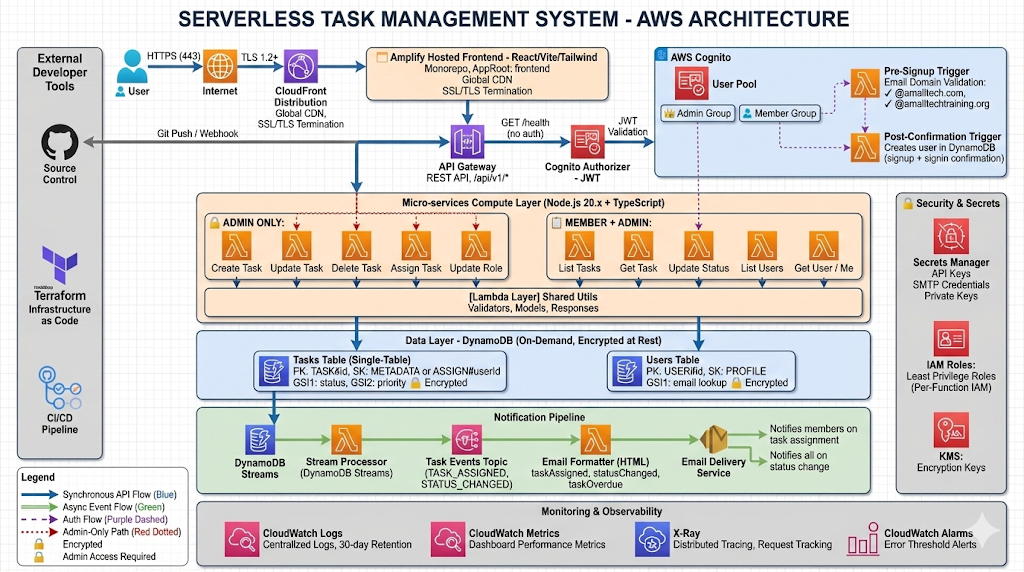
The system is structured across six distinct layers, each with a defined responsibility boundary:
| Layer | Components | Purpose |
| Frontend | React 19, Vite, Tailwind, Amplify | SPA with role-based UI rendering |
| CDN / Hosting | CloudFront, Amplify | Global delivery, SSL termination |
| API | API Gateway (REST) | Request routing, throttling, CORS |
| Auth | Cognito User Pools + Triggers | JWT authentication, RBAC |
| Compute | Lambda (Node.js 20.x, TypeScript) | 15+ microservice handler functions |
| Data / Notifications | DynamoDB, Streams, SNS, SES | Persistence + async event pipeline |
Data flows: HTTPS → CloudFront → Amplify frontend → API Gateway → Cognito JWT authorizer → Lambda handler → DynamoDB. Notifications fire asynchronously: DynamoDB Stream → stream processor Lambda → SNS topic → email formatter Lambda → SES.
Infrastructure as Code: Modular Terraform
All AWS resources are defined in Terraform using a modular structure that separates concerns and enables environment-specific configuration without code duplication.
terraform/
├── modules/
│   ├── lambda/        # Function packaging, IAM role, environment variables
│   ├── api-gateway/   # REST API, resources, methods, integrations
│   ├── cognito/       # User Pool, client, triggers
│   ├── dynamodb/      # Table, GSIs, stream configuration
│   ├── amplify/       # Frontend hosting, build config
│   ├── notifications/ # SNS topic, SES, Lambda subscriptions
│   └── iam/           # Cross-module IAM policies
└── environments/
    └── dev/           # Backend config, tfvars
Remote state is managed in S3 with DynamoDB locking for safe concurrent operations:
cd terraform/scripts
./bootstrap-backend.sh
# Creates: s3://taskmanager-terraform-state + DynamoDB table taskmanager-lock
Lambda module — least-privilege IAM per function:
module "lambda_tasks_create" {
  source        = "../../modules/lambda"
  function_name = "${var.project_name}-tasks-create"
  handler       = "handlers/tasks/create.handler"
  runtime       = "nodejs20.x"
  source_dir    = "${path.root}/../../backend/dist"

  environment_variables = {
    DYNAMODB_TABLE    = module.dynamodb.table_name
    COGNITO_USER_POOL = module.cognito.user_pool_id
    AWS_NODEJS_CONNECTION_REUSE_ENABLED = "1"
  }

  iam_policy_statements = [
    {
      Effect   = "Allow"
      Action   = ["dynamodb:PutItem", "dynamodb:GetItem"]
      Resource = module.dynamodb.table_arn
    }
  ]
}
Each Lambda function has a dedicated IAM policy scoped to only what it needs. The create task handler can write to DynamoDB — nothing else. Least-privilege is enforced at the function level, not the service level.
DynamoDB Single-Table Design
The most consequential architectural decision in this project is the DynamoDB table design. The application uses a single table for all entities — tasks, users, and assignments — with a composite primary key pattern that serves all required query patterns from one table.
Access Patterns
| Access Pattern | PK | SK | Index |
| Get task by ID | TASK#{taskId} | METADATA | Primary |
| List tasks by status | status | TASK#{taskId} | GSI: status-index |
| Get assignments for task | TASK#{taskId} | ASSIGN#{userId} | Primary (begins_with) |
| Get tasks assigned to user | USER#{userId} | TASK#{taskId} | GSI: user-tasks-index |
| Get user profile | USER#{userId} | PROFILE | Primary |
Why single-table? DynamoDB has no JOIN equivalent. Multi-table designs require multiple network round-trips to compose related data. Single-table design collapses these into one query() call using composite sort key prefixes.
The trade-off: access patterns must be defined upfront. Changes after deployment may require index additions.
// Task item — primary entity
{
  PK: "TASK#01HXYZ...",
  SK: "METADATA",
  taskId: "01HXYZ...",
  title: "Implement user auth",
  status: "IN_PROGRESS",
  priority: "HIGH",
  createdBy: "USER#01HABC...",
  dueDate: "2024-12-31",
  GSI1PK: "IN_PROGRESS",       // Enables status-based queries
  GSI1SK: "TASK#01HXYZ..."
}

// Assignment item — same table, different key pattern
{
  PK: "TASK#01HXYZ...",
  SK: "ASSIGN#USER#01HJKL...", // begins_with("ASSIGN#") returns all assignees
  taskId: "01HXYZ...",
  userId: "01HJKL...",
  assignedAt: "2024-01-15T10:30:00Z"
}
Terraform DynamoDB configuration:
resource "aws_dynamodb_table" "main" {
  name         = "${var.project_name}-${var.environment}"
  billing_mode = "PAY_PER_REQUEST"
  hash_key     = "PK"
  range_key    = "SK"

  attribute { name = "PK";     type = "S" }
  attribute { name = "SK";     type = "S" }
  attribute { name = "GSI1PK"; type = "S" }
  attribute { name = "GSI1SK"; type = "S" }

  global_secondary_index {
    name            = "status-index"
    hash_key        = "GSI1PK"
    range_key       = "GSI1SK"
    projection_type = "ALL"
  }

  stream_enabled   = true
  stream_view_type = "NEW_AND_OLD_IMAGES"  # Required for notification pipeline

  server_side_encryption { enabled = true }
  point_in_time_recovery { enabled = true }
}
PAY_PER_REQUEST billing eliminates capacity planning and scales to zero between usage periods — appropriate for bursty, unpredictable task management workloads.
Cognito RBAC: Admin and Member Roles
Authentication is JWT-based via Cognito User Pools. Roles are stored in Cognito groups (ADMIN, MEMBER) and enforced in Lambda middleware. Admin users have full CRUD access; Members can view assigned tasks and update task status only.
Post-Confirmation Trigger — Idempotency is Critical
The post-confirmation Lambda trigger creates the user record in DynamoDB when signup completes:
// handlers/auth/post-confirmation.ts
export const handler = async (event: PostConfirmationTriggerEvent) => {
  const { userName, request: { userAttributes } } = event;

  await dynamoClient.send(new PutItemCommand({
    TableName: process.env.DYNAMODB_TABLE!,
    Item: marshall({
      PK: `USER#${userName}`,
      SK: "PROFILE",
      userId: userName,
      email: userAttributes.email,
      role: "MEMBER",
      createdAt: new Date().toISOString(),
    }),
    ConditionExpression: "attribute_not_exists(PK)",  // Idempotency guard
  }));

  await cognitoClient.send(new AdminAddUserToGroupCommand({
    UserPoolId: event.userPoolId,
    Username: userName,
    GroupName: "MEMBER",
  }));

  return event;
};
The ConditionExpression is not optional. The post-confirmation trigger fires on both the initial signup confirmation AND on subsequent sign-in confirmations when MFA or email verification is involved. Without attribute_not_exists(PK), every sign-in would overwrite the user's DynamoDB profile — silently resetting any admin-assigned role changes back to MEMBER.
RBAC Middleware
// middleware/auth.ts
export const requireRole = (requiredRole: "ADMIN" | "MEMBER") => {
  return (event: APIGatewayProxyEvent): void => {
    const claims = event.requestContext.authorizer?.claims;
    if (!claims) throw new UnauthorizedError("No auth claims");

    const groups: string[] = JSON.parse(claims["cognito:groups"] || "[]");
    const userRole = groups.includes("ADMIN") ? "ADMIN" : "MEMBER";

    if (requiredRole === "ADMIN" && userRole !== "ADMIN") {
      throw new ForbiddenError("Admin access required");
    }
  };
};
Event-Driven Notifications: DynamoDB Streams → SNS → SES
Notifications are fully decoupled from the write path. When a task is assigned, the Lambda handler writes to DynamoDB and returns immediately. The notification pipeline runs asynchronously via DynamoDB Streams.
DynamoDB Table (NEW_AND_OLD_IMAGES stream)
    ↓
Stream Processor Lambda
    ↓
SNS Topic (task-notifications)
    ↓
Email Formatter Lambda (SNS subscriber)
    ↓
SES → recipient email
Stream processor — detects assignment and status change events:
export const handler = async (event: DynamoDBStreamEvent) => {
  for (const record of event.Records) {
    if (record.eventName !== "MODIFY" && record.eventName !== "INSERT") continue;

    const newImage = unmarshall(record.dynamodb?.NewImage || {});
    const oldImage = unmarshall(record.dynamodb?.OldImage || {});

    // New assignment — SK starts with ASSIGN#
    if (newImage.SK?.startsWith("ASSIGN#") && record.eventName === "INSERT") {
      await sns.send(new PublishCommand({
        TopicArn: process.env.SNS_TOPIC_ARN!,
        Message: JSON.stringify({
          type: "TASK_ASSIGNED",
          taskId: newImage.taskId,
          userId: newImage.userId,
        }),
      }));
    }

    // Status change — same SK=METADATA, different status field
    if (newImage.SK === "METADATA" && oldImage.status !== newImage.status) {
      await sns.send(new PublishCommand({
        TopicArn: process.env.SNS_TOPIC_ARN!,
        Message: JSON.stringify({
          type: "STATUS_CHANGED",
          taskId: newImage.taskId,
          fromStatus: oldImage.status,
          toStatus: newImage.status,
        }),
      }));
    }
  }
};
Why SNS as intermediary — not direct SES from the stream processor?
The task write Lambda and stream processor have no SES dependency. Adding a new notification channel (Slack, webhook, mobile push) means adding a new SNS subscriber — zero changes to the stream processor or task handlers. SNS also provides retry semantics and dead-letter queue support if the email formatter Lambda fails.
Lambda Cold Start Optimization
Cold start latency is proportional to bundle size. The project uses esbuild rather than tsc for bundling:
{
  "scripts": {
    "build": "esbuild src/handlers/**/*.ts --bundle --platform=node --target=node20 --outdir=dist --external:@aws-sdk/*"
  }
}
--external:@aws-sdk/* excludes the AWS SDK from the bundle — it is provided by the Node.js 20 Lambda runtime, so bundling it adds ~12MB to each function package with no benefit. Combined with connection reuse:
// lib/dynamodb.ts — module-level client, initialized once per Lambda container
const client = new DynamoDBClient({ region: process.env.AWS_REGION, maxAttempts: 3 });
export const dynamo = DynamoDBDocumentClient.from(client);
The environment variable AWS_NODEJS_CONNECTION_REUSE_ENABLED=1 (set in Terraform) instructs the SDK HTTP agent to reuse TCP connections across invocations within the same warm container — eliminating the TCP handshake cost on every DynamoDB call.
CORS in Serverless: Three Layers
CORS must be configured at three distinct points. Missing any one produces a browser CORS error that hides the actual HTTP status code.
Layer 1 — API Gateway OPTIONS method and Gateway Responses:
resource "aws_api_gateway_gateway_response" "cors_4xx" {
  rest_api_id   = var.rest_api_id
  response_type = "DEFAULT_4XX"
  response_parameters = {
    "gatewayresponse.header.Access-Control-Allow-Origin" = "'https://yourapp.amplifyapp.com'"
  }
}
Layer 2 — Lambda response headers (every handler):
headers: {
  "Access-Control-Allow-Origin": process.env.ALLOWED_ORIGIN || "*",
  "Access-Control-Allow-Headers": "Content-Type,Authorization",
  "Access-Control-Allow-Methods": "GET,POST,PUT,DELETE,PATCH,OPTIONS",
}
Layer 3 — Gateway Responses for auth errors: A failed Cognito JWT validation returns a 401 from API Gateway, not from Lambda. API Gateway error responses need their own CORS headers configured in aws_api_gateway_gateway_response — otherwise a 401 shows as a CORS error in the browser, hiding the actual authentication failure.
CI/CD Pipeline
Two GitHub Actions workflows:
ci.yml — lint, test, security scan on every push:
├── lint-and-test: tsc --noEmit, Jest with coverage, Codecov upload
├── security-scan: npm audit --audit-level=high, Checkov (Terraform IaC)
└── terraform-validate: fmt check, init, validate
terraform-plan.yml — posts plan output as PR comment when Terraform files change.
The OIDC permission requirement — the most common silent failure in new GitHub Actions OIDC setups:
permissions:
  id-token: write   # Without this, configure-aws-credentials fails silently
  contents: read
Without id-token: write, the action fails with "Credentials could not be loaded" — the error message does not mention the permissions block, making this hard to diagnose the first time.
Amplify Monorepo Configuration
The repository contains both backend/ and frontend/. Amplify's default build assumes the repository root is the project root. Setting appRoot: frontend in amplify.yml directs Amplify to build only the frontend subdirectory:
version: 1
applications:
  - frontend:
      phases:
        preBuild:
          commands: [npm ci]
        build:
          commands: [npm run build]
      artifacts:
        baseDirectory: dist
        files: ["**/*"]
      cache:
        paths: [node_modules/**/*]
    appRoot: frontend  # Without this, Amplify builds from repo root and fails
Production Considerations
DynamoDB capacity planning: PAY_PER_REQUEST is appropriate for unpredictable workloads. For production systems with predictable traffic patterns, provisioned capacity with auto-scaling provides lower per-request cost at volume.
Jaeger vs. X-Ray tracing: X-Ray integrates natively with Lambda, API Gateway, and DynamoDB with minimal configuration. For more complex microservice tracing requirements, OpenTelemetry provides richer instrumentation but requires explicit SDK setup in each function.
Single-table design limitations: This design requires upfront access pattern analysis. If you later need to query tasks by assignee AND by status (multi-condition queries), you need an additional GSI with a composite key. Design the GSI set before the first production write — adding GSIs after deployment does not backfill existing items to the new index projection.
Lambda function isolation: Each handler is a separate deployment package. This means a bug in the tasks-delete handler cannot crash the tasks-create handler — isolation at the function boundary is a core serverless reliability property.
Conclusion
The serverless architecture documented here provides a production-grade task management system with zero server management, automatic scaling to zero, and built-in high availability across AWS availability zones.
Key architectural decisions and their rationale:
- Single-table DynamoDB design — all access patterns served with single
query()calls; requires upfront schema design - Post-confirmation trigger idempotency —
ConditionExpressionprevents role resets on subsequent auth events - Streams → SNS → SES decoupling — write path has no email dependency; new notification channels are SNS subscribers
- esbuild + external AWS SDK — minimizes cold start bundle size without losing TypeScript type safety
- CORS at three layers — method, Lambda headers, and Gateway Responses for authorizer error cases
- OIDC for CI/CD AWS auth — no long-lived access keys in GitHub Secrets